Welcome to ASEAN
This section assumes you have been accepted as a builder in ASEAN. If you are not please look at this guide
Choosing a Build Site
- Check boundaries first: Webmap → top-left → “[ALL] Boundaries.”
- If the location is outside the boundaries, consult the support bot before building.
Starting a Build Site
Once your build site has been approved — or confirmed to be within a boundary — you must create a warp so the site is not lost.
- Country code: use a 2-letter lowercase code (country codes).
- Naming: use PascalCase (e.g.,
JoeMama,TalingChan). - Hidden warps: prefix with
~to hide from the in-game list and webmap (e.g.,/warp ~KfcVn). - Do not abbreviate names.
Format
-
Most countries:
/warp {country},{city/state},{OSM Query},{warpName}Example:/warp th,Bangkok,Khlongsan,Iconsiam -
Singapore:
/warp sg,{OSM Query},{warpName}Example:/warp sg,AngMoKio,SomeShopFor Singapore MRT stations, add
-MRTat the end of the warp name. Example:/warp sg,Punggol,Oasis-MRT
OSM Query for the Warp
As ASEAN countries use different naming systems for districts and subdistricts, we standardise names by querying OpenStreetMap (OSM). This ensures the correct district or subdistrict name is used.
Examples of what belongs in the “OSM Query” field:
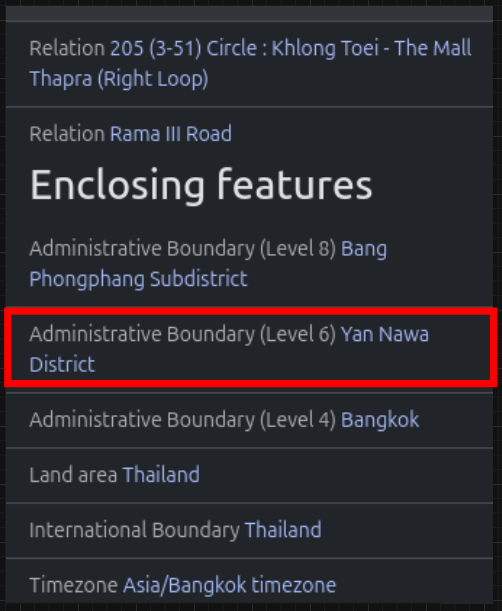 The warp would be
 /warp th,Bangkok,YanNawaDistrict,{name}
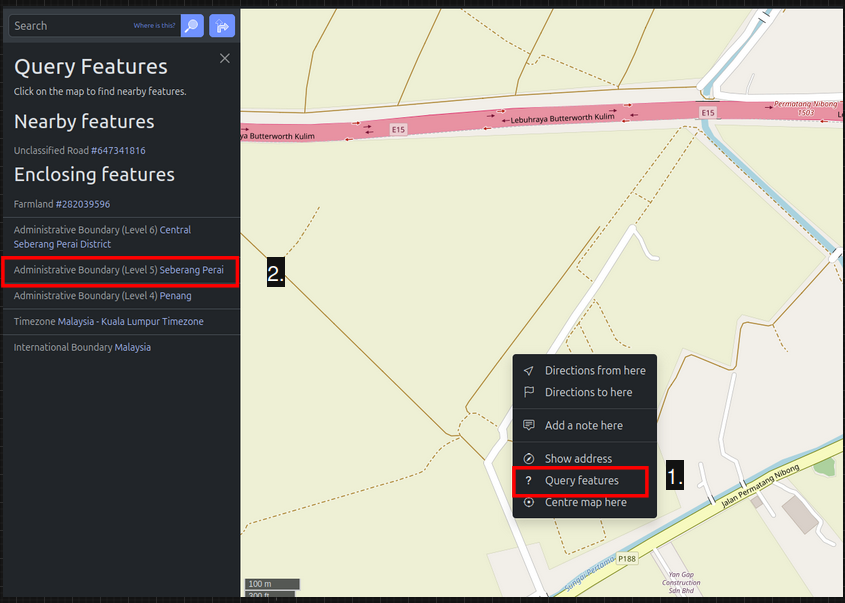 The warp would be
 /warp my,Penang,SeberangPerai,{name}
- For Singapore, use the Administrative Boundary (Level 6) for the entire island.